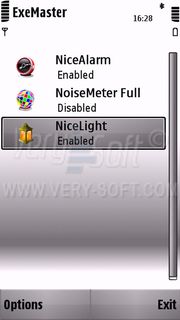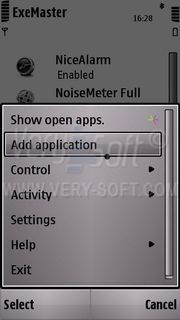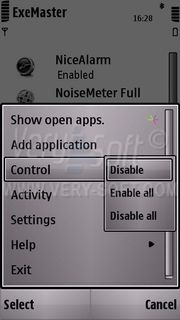
Meet - ExeMaster!
Utility to automate application launching process on Symbian OS devices.
The main function of the program is to configure autorun for applications installed on your device.
Features
- Specify application to autostart with operating system load;
- Defining the startup type for each application;
- Determination of startup parameters for each application;
- Simple, user-friendly interface.
ExeMaster usage
Just a few clicks and you'll forget all about hand-loading everyday applications after you turn on your Symbian smartphone. In addition, you can now determine exactly how the application should be run and to identify additional options for it's startup.
Simply add all necessary programs to the startup list and next time the device is switched on all applications will be launched automatically.
ExeMaster is easy to use, has a nice interface and is compatible with all models of Symbian S60 smartphones.
Compatibility. System Requirements
Application requires up to 700kb of ROM to install and up to 300 kb of RAM to use.
Symbian OS v.9.1 UI S60 v.3.0
Nokia 3250 Nokia 5500 Nokia N71 Nokia N73 Nokia N75 Nokia N80 Nokia N91 Nokia N92 Nokia N93 Nokia N93i Nokia E50 Nokia E60 Nokia E61 Nokia E61i Nokia E62 Nokia E65 Nokia E70 Nokia N77 Samsung i400
|
Symbian OS v.9.2 UI S60 v.3.1
Nokia 6110 Nokia 6290 Nokia N76 Nokia N95 LG KS10 Nokia 5700 Nokia 6120 Nokia 6121 Nokia 6124 Nokia N81 Nokia N81 8gb Nokia N95 8gb Nokia N82 Nokia E51 Nokia E90 Nokia E71 Samsung G810 Samsung i450 Samsung i520 Samsung i550 Samsung i560 LG KT610 Nokia E66 Nokia E63
|
Symbian OS v.9.3 UI S60 v.3.2
Nokia 6210 Nokia 6220 Nokia N78 Nokia N96 Nokia N79 Nokia N85 Nokia 5320 Samsung L870 Samsung i8510 Samsung i7110 Nokia 5630 Nokia 5730 Nokia 6650 Nokia 6720 Nokia E52 Nokia E75 Nokia N86 Nokia 6710 Nokia 6730 Nokia 6760 Nokia E55 Nokia E72
|
Symbian OS v.9.5 UI S60 v.5.0
Nokia 5800 Nokia N97 Nokia 5530 Samsung i8910 SonyEricsson Satio Nokia N97 mini Nokia X6
|
Please, always try application BEFORE buy.
Installation
- Transfer the downloaded "ExeMaster.sis" file to your mobile handheld;
- Open a folder where it was stored. ("Inbox", by default);
- Start and complete installation dialog;
- Start the application.
User Guides
Download ExeMaster User's Manual (zip: 335 kb / pdf: 345 kb) English language.
Download ExeMaster User's Manual (zip: 112 kb / pdf: 131 kb) Russian language.
Localization
ExeMaster interface supports next languages:
Additional localization patches can be found in ExeMaster thread on our forum.
Trial period
Trial period is limited to 7 days with no additional restrictions.
Technical Support
VerySoft Support Team is always ready to assist you with any question concerning software products.
To force obtaining necessary information please follow the advices from the Support page.
FAQ and Discussion
ExeMaster has a separate thread in VerySoft Forum. Visit it to access friendly community, find FAQ and share your opinion.